Plot Window
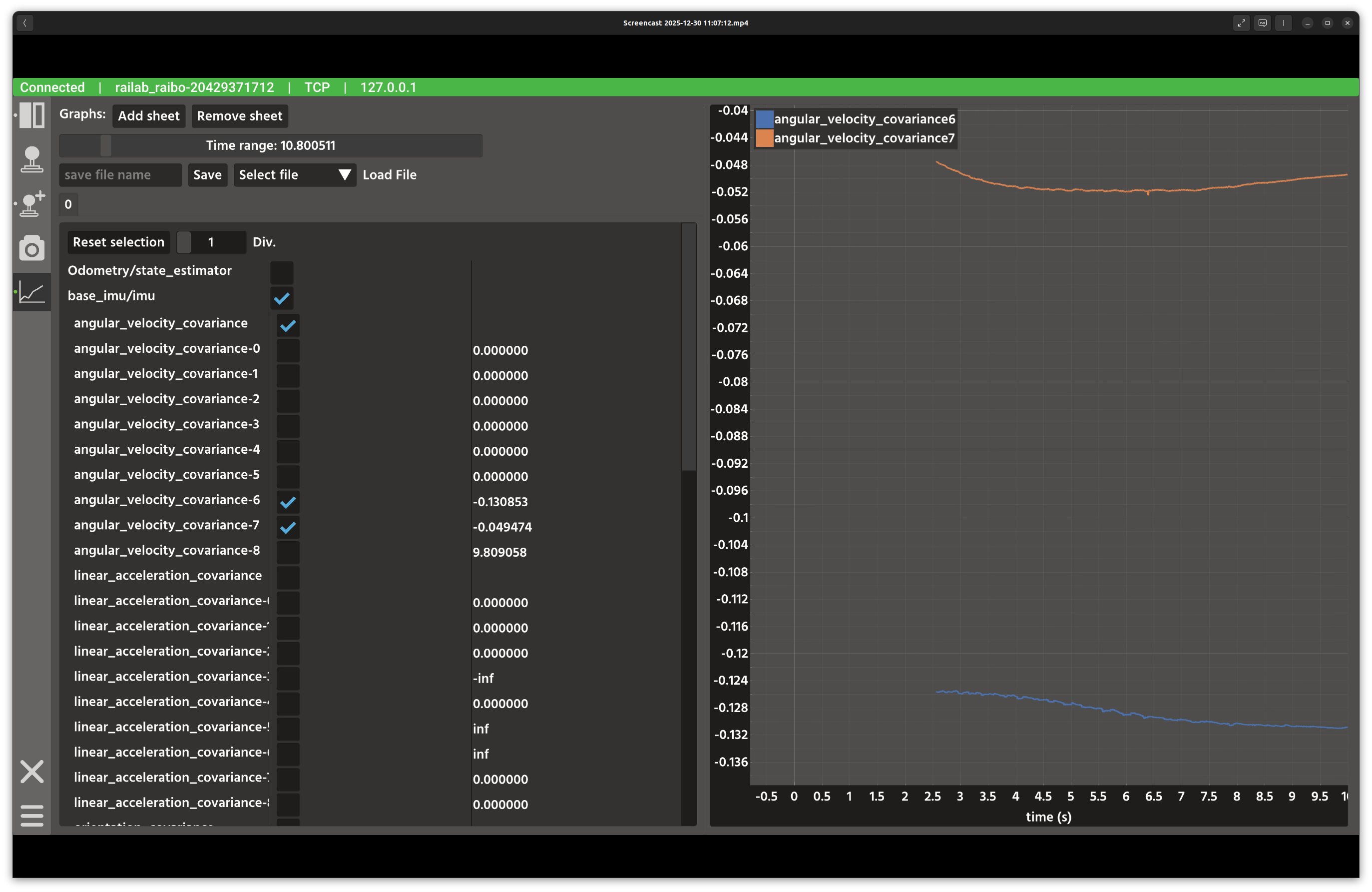
Plot window.
Overview
In the screenshot above, the left column is used to select topics and fields, while the right side renders live plots. Tabs allow multiple plotting sheets.
Layout
Topic list: all publishers from the active connection.
Plot sheets: tabs for multiple plot layouts and selections.
Graph area: live plots rendered with ImPlot.
Save/Load bar: persistent storage of plot selections per device type.
Controls and Indicators
Add sheet / Remove sheet manage the number of plot tabs.
Time range slider adjusts the horizontal window.
Save stores the selected fields under
$RAISIN_ROOT/raisin_gui_plot_window/<deviceType>/.Load restores a previously saved configuration.
Data Sources
Subscriptions use
any_message::msg::AnyMessageGraphto parse arbitrary message types from the active connection.
Notes
Use fewer sheets if you notice sluggish rendering on low-end GPUs.
Saved selections are scoped by device type so multiple robots can have independent layouts.